Start with VS Code if you want a free editor with a vast extension library and the freedom to bring your own AI. Choose Cursor if you want to delegate whole tasks to agents, run them in the cloud and check in from your phone, and the plan price fits your usage. Both have free options, so try the same real task in each before you commit.
Prices checked on against each app's official pricing page.
Free $0/month; Plus $8/month; Premium $30/month; Super $100/month; Ultra $200/month
Yes
iPhone, Mac, Windows, Linux, Web
Visual Studio Code and Cursor are two of the most talked-about code editors, and both let you hand work to AI agents. This guide is for developers deciding where to write code day to day. We compared what each vendor says its editor does, plus pricing and platforms, from official pages checked on November 1, 2026.
1A free, open-source editor with a huge extension library
Visual Studio Code
Free and open source; agents can be used free with a GitHub account
Visual Studio Code is Microsoft's free, open-source code editor. It comes with a built-in terminal, debugger and Git, and supports more than 80,000 extensions, so you can shape it for almost any language or workflow. You can hand tasks to AI agents using GitHub Copilot, other providers or your own API key. Agents can be used free with a GitHub account, and Copilot's paid plans are sold separately. It runs on Mac, Windows and Linux, and in the browser at vscode.dev.
Pick it if you want a free, flexible editor where AI is one tool among many, and you'd like to choose your own AI provider.
Free $0/month; Plus $8/month; Premium $30/month; Super $100/month; Ultra $200/month
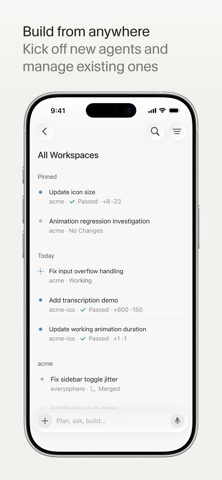
Cursor, from Anysphere, is an AI-first code editor and coding agent. The idea is that you hand it a task and it writes, tests and demos the changes while you review. You can choose models from several providers. Cloud agents run in parallel for long jobs, and Cursor also works from the terminal, Slack, GitHub pull requests and an iPhone app. There is a free plan, and paid plans start at $8 a month for Plus, rising to $200 a month for Ultra. Teams start at $30 per user per month.
Pick it if you want AI agents at the center of how you code, and you're happy to pay for heavier use.
Zed is a fast, open-source code editor built in Rust, with AI agents, edit prediction, live collaboration and a Vim mode. It runs on Mac, Linux and Windows. The Personal plan is free, Pro is $10 a month after a free trial, and Business is $30 per seat per month.
Verdict
Start with VS Code if you want a free editor with a vast extension library and the freedom to bring your own AI. Choose Cursor if you want to delegate whole tasks to agents, run them in the cloud and check in from your phone, and the plan price fits your usage. Both have free options, so try the same real task in each before you commit. If speed matters most, give Zed a look too.
Quick answers
Visual Studio Code or Cursor: which should you pick?
Start with VS Code if you want a free editor with a vast extension library and the freedom to bring your own AI. Choose Cursor if you want to delegate whole tasks to agents, run them in the cloud and check in from your phone, and the plan price fits your usage. Both have free options, so try the same real task in each before you commit.
Is Visual Studio Code or Cursor free?
Yes. Both Visual Studio Code and Cursor have a free plan or are free.
How much do they cost?
Visual Studio Code: Free and open source; agents can be used free with a GitHub account. Cursor: Free $0/month; Plus $8/month; Premium $30/month; Super $100/month; Ultra $200/month.

 Handing whole coding tasks to AI agents