Mac users have lots of good note apps to pick from. This guide is for anyone choosing a notes app for their Mac, and often their iPhone too. We compared the note apps in our inventory that run on Mac and picked three. Prices were checked on November 1, 2026.
1 Everyday notes with zero setup
Apple Notes
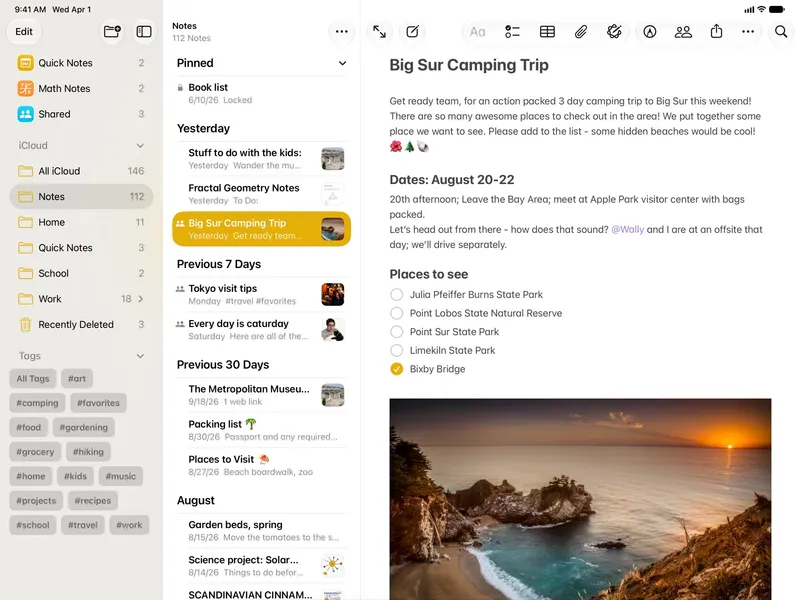
Free with every Apple device Apple Notes comes with every Mac. It handles text, checklists, sketches, attachments, scans and links, with search, folders and tags, locked notes and collaboration. It syncs through iCloud and works on iPhone, iPad, Apple Watch and the web.
Pick it if you want a free, reliable notes app that's already installed.
2 Markdown writing with tags
Bear
Free; Bear Pro subscription adds sync Bear is a writing and note-taking app with Markdown-style formatting for Apple devices. Notes are organised with tags, and it supports attachments, scanning, search, sharing, export and iCloud sync. There's a free plan, and Pro is inexpensive with a 7-day trial.
Pick it if you write a lot and want a focused app that uses tags instead of folders.
3 Linked notes stored as local files
Obsidian
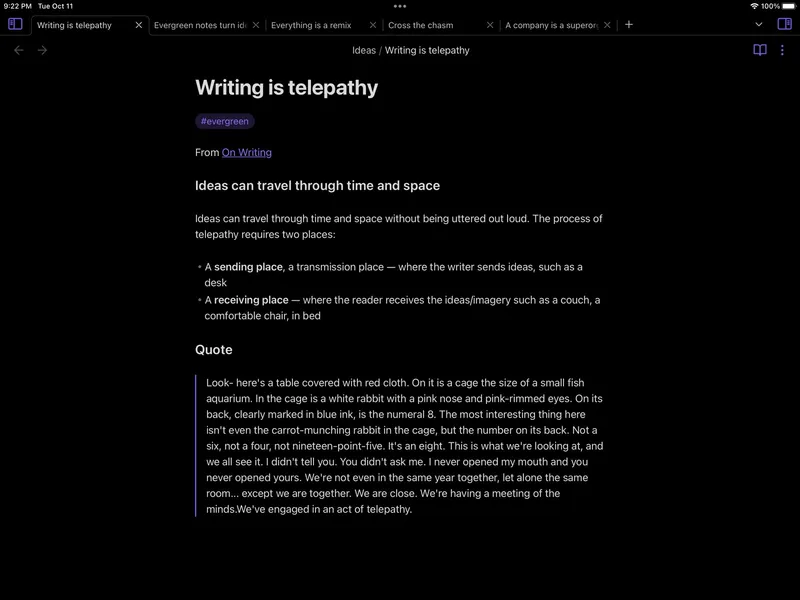
Free for personal use; Sync and Publish are paid add-ons Obsidian keeps your notes as plain-text Markdown files in a local vault. You can link notes, see a graph view, and add plugins and themes. It also runs on Windows, Linux and Android, which helps if you don't only use Apple devices.
Pick it if you want a linked knowledge base and notes that aren't tied to Apple.
Also consider: Craft (polished documents with offline access) and NotePlan (Markdown notes, tasks and calendar in daily notes).
Most Mac users should start with Apple Notes, since it's free and does a lot. Writers who like Markdown will enjoy Bear. If you want to link ideas, own your files or switch between Mac and non-Apple devices, choose Obsidian.